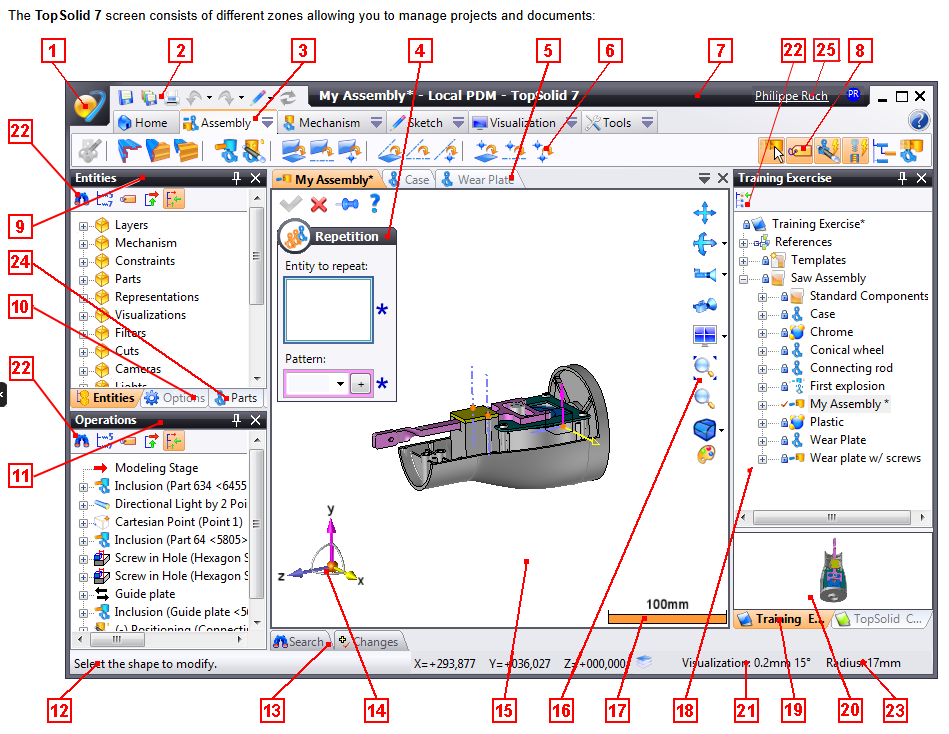
A very powerful, yet complex CAD/CAM software
World leader in CAD/CAM software development, TOPSOLID provides a wide range of products, which come with a heavy need for detailed documentation. To empower users and improve product usability, TOPSOLID’s documentation team maintains an extensive library of content across many products and versions.
Maintaining more than 15,000 UI icons manually across dozens of DITA topics is a nightmare: outdated visuals, inconsistent procedures, and days lost in repository clean-up. By combining Componize CCMS, Alfresco, and a simple PowerShell script, TOPSOLID turned icon management into a fully automated CCMS workflow and gave writers instant access to always-up-to-date icons for content reuse.
For David and his team, DITA combined with a CCMS quickly became the key to delivering quality and streamlining content production. Thanks to the reusability and modularity brought by DITA, and the efficient management enabled by Componize CCMS, they can deliver steadily while keeping a high level of consistency.
The documented products are complex and require numerous icons to illustrate procedures and help users identify options. But with more than 15,000 icons produced and maintained by the product team in a dedicated repository, how can you be sure you are using the right version?
Why bother when a machine does it better?
Faced with this challenge, David was determined to find a sustainable and hands-off solution and make sure that the latest updates never slip through the net. What he knew:
- All icons are stored in the development repositories of the products, in ICO format.
- The authors need to have the icons available in PNG format, in a dedicated space within the CCMS.
- Componize CCMS has flexible APIs for automation projects.
With a good textbook about PowerShell, and a helping hand from his favorite AI assistant, he developed a script that would synchronize icons from the code repository to the CCMS. The script runs automatically on David’s computer for a couple of minutes every day, fetching and processing all the ICO files.
The icons are converted from .ico to .png, resized, saved into the CCMS, and added to a DITA warehouse topic that will allow easy reuse of the icons into real documents. If an icon already exists in a previous version, it is automatically updated with the latest version found in the production code repository.
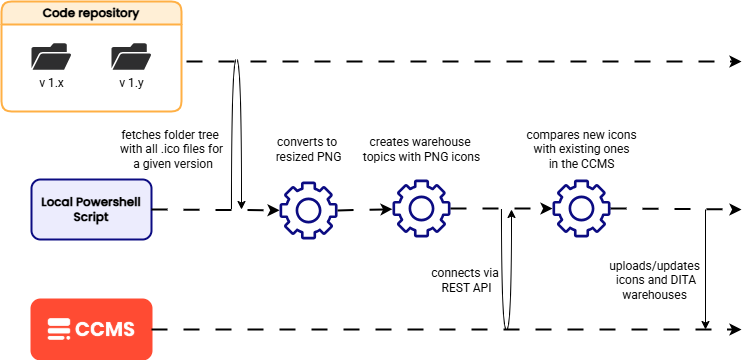
How the CCMS automation workflow works in practice
Automating icon management at TOPSOLID comes down to a clear, repeatable workflow that links the product team’s code repositories with Componize CCMS.
→ The goal is simple: Make sure documentation assets always match the current state of the software.
The script scans the development repositories and detects every ICO file that should be available to documentation authors. Each icon is converted to PNG and resized according to standards agreed with the documentation team, so visuals stay consistent across manuals and outputs.
Once processed, the icons are sent to Componize CCMS and stored in a dedicated area, then referenced in a DITA warehouse topic that serves as a central catalog. Writers can pick icons directly from this catalog wherever they need them, without worrying about file paths or local copies.
When an icon changes in the production repository, the workflow updates the corresponding PNG in the CCMS. Authors don’t have to touch existing topics: through DITA reuse, the latest icon is automatically used at publication time, even in content that was written months before.
Learning on the fly and making it work
While David’s expertise lies in web development and content management, scripting and automation weren’t initially part of his toolkit. But that did not stop him from experimenting, and with the help of ChatGPT and the clear, accessible documentation available for Alfresco and Componize CCMS, he quickly bridged the gap.
Because Alfresco is open source, most of its technical foundations are well-documented and widely discussed, giving AI tools plenty of reliable material to draw from. Combined with David’s own curiosity and problem-solving mindset, that made it possible to go from near-zero knowledge of automation to a working script over several iterations.
It’s a great example of how a open-source-based CCMS can be very reliable in today’s context of working with AI, and empowers skilled professionals to explore new domains, experiment confidently, and create something genuinely useful, even outside their usual expertise.
A very positive evolution for writers
With this automation, authors have access to the latest version of icons directly as reusable DITA elements. When writing documentation, they can be sure that they are using accurate illustrations, and that their procedures will remain clear for the end users.
The best part? Even without manual action, the DITA reuse mechanism ensures that the correct icon version is inserted at publication time.
By combining the API capabilities of Componize with a good strategic vision, TOPSOLID significantly enhanced accuracy and consistency in their documents, while reducing the effort required to manage them.
“More than comfort, it became a necessity. I used to spend days updating the icon repositories, and there were still missing items.
It took me a little time developing the automation, but that was really worth it. I did not know much about Alfresco scripts, APIs, … But ChatGPT helped me a lot (apart from a few hallucinations) and was able to guide me and debug when necessary.
Now writers have access to every icon from the software.”
David ARNOULT, Edition Manager at TOPSOLID (France)

A great step forward — and not the last one
By trusting Componize CCMS capabilities, David transformed a great idea into a scalable solution. Even though he started from scratch, he managed to take advantage of APIs by learning, experimenting, and debugging until he reached a satisfying result. End users around the globe benefit from a greater level of quality and clarity in the documentation of their daily tools, while writers at TOPSOLID have easier access to accurate resources.
But this is not over yet: at Componize, we encourage our users to make the most out of our products, and we will continue supporting TOPSOLID in their evolution towards efficient content management. The next step will be to leverage even more of the automation capabilities of Alfresco and Componize CCMS, and run this script directly on the server. This will reduce latency, and improve security and consistency.
We are very proud when our writers, content managers and document architects innovate, make good use of the tools that we offer, and push the boundaries. So — why not you next?
COMPONIZE
Newsletter
Get expert insights on structured content and stay ahead in technical documentation.
Sign up to our monthly newsletter !