Moving to structured content rarely means that every Word document, PDF, FrameMaker file or legacy asset disappears overnight.
For most documentation teams, structured and unstructured content coexist for months or even years. Some content has already moved to DITA XML. Some still needs to be migrated. Other files must remain available because they support existing products, releases or internal workflows.
We recently asked our clients: “Aside from graphical or video resources, do you store any other types of unstructured content in Componize CCMS?” 9 out of 10 customers answered yes.
That result reflects a practical reality: adopting structured content does not eliminate the need to manage existing content. Documentation teams still need a way to keep control of both while their content architecture evolves.
Structured and unstructured content often need to coexist
Documentation environments are rarely built around a single format.
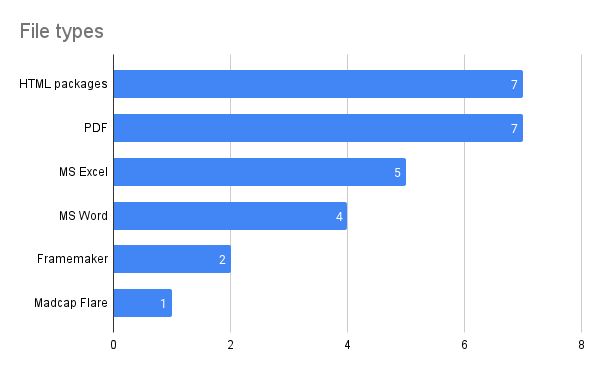
Our clients store MS Word documents, HTML packages, PDFs, FrameMaker files, spreadsheets and other content alongside structured formats in Componize CCMS.
This mix is not necessarily a sign of a poorly managed documentation environment. It is often the result of years of product development, different authoring systems, acquisitions, changing standards or a phased migration to structured content.
The operational challenge is therefore not simply to choose between structured and unstructured content. It is to manage both without creating another fragmented content repository during the transition.
If you are evaluating a CCMS and the amount of existing or legacy content is making the transition difficult to plan:
The content formats documentation teams actually manage
The responses from our clients show how varied a real documentation repository can be.
HTML packages, PDFs, MS Word, MS Excel and FrameMaker are among the formats stored and managed alongside structured content in Componize CCMS. Some are working files. Others are legacy sources, published outputs or supporting resources that still need to remain accessible.
This matters when planning a migration. Replacing every legacy format at once is not always practical. Teams may need to prioritize specific content sets, migrate them progressively and continue supporting existing documentation at the same time.
Managing the transition between structured and unstructured content
One of the clearest findings from our survey is that many organizations use structured and unstructured content at the same time.
Even after adopting a structured format such as DITA XML, legacy content remains part of the documentation lifecycle. Existing manuals may still live in Word or FrameMaker. Published PDFs need to remain available. Other teams may continue contributing information in formats outside the structured authoring workflow.
For Documentation Managers, this creates a migration and governance problem rather than simply a file-format problem. The team needs to know what has already been migrated, what still needs to move and where the relevant source and published content can be found.
A CCMS that can accommodate both structured and unstructured content can support this period of coexistence without forcing the organization to complete the entire migration before it can start improving its documentation environment.
What is structured content?
Structured content follows a defined model rather than being managed as complete standalone documents. Formats such as DITA XML organize information into reusable components or topics with a consistent structure.
This makes it possible to manage, retrieve and reuse information more systematically across multiple publications, products or variants.
Come read our article about “What is structured content?” to find out more.
What is unstructured content?
Unstructured content does not follow the same predefined content model. Word documents, PDFs, spreadsheets and many legacy documentation formats are common examples.
These formats remain important in many organizations, but they generally offer less granular control over content reuse and structure. That becomes particularly relevant when documentation teams need to manage large numbers of products, versions or publications.
Keeping source files and published content in the same environment
The challenge is not limited to authoring formats. Documentation teams also need to manage the relationship between source content and what has actually been published.
Componize CCMS allows users to store published content alongside source files, and to view, annotate and collaborate on PDFs and HTML packages directly within the system. This keeps more of the documentation workflow in one environment instead of distributing files across separate repositories and collaboration tools.
The integration of Microsoft Office and Google Docs with Componize also enables users to browse, open and save Word, PowerPoint, Excel and Google Docs documents directly from the CCMS.
For teams working through a phased transition, this can be particularly useful: structured content can evolve without disconnecting the team from the files and formats that still form part of the current documentation lifecycle.
Managing different types of content with Componize CCMS
A documentation repository rarely becomes uniform simply because a team introduces structured authoring.
Componize CCMS supports different structured and unstructured content formats within the same environment. This allows organizations to consolidate content that might otherwise remain distributed across several platforms while they progressively move toward a more structured content model.
Kaplan provides a concrete example. Before moving to Componize, the organization was managing DITA, DocBook and HTML files across three separate platforms. By consolidating these formats in Componize, Kaplan simplified its IT infrastructure and reduced associated costs.
The important point is not simply the number of file formats a CCMS can store. It is whether the documentation team can reduce fragmentation and maintain control while different formats continue to coexist.
For organizations with DITA, DocBook, HTML, MS Word, MS Excel or other structured and unstructured content, consolidating these assets can provide a more manageable foundation for the documentation lifecycle and for future migration work.
If you are interested, read more about the case study of Kaplan using Componize CCMS to help students achieve their goals.
How our clients use unstructured content in Componize
We also asked our clients how they use unstructured content alongside their structured documentation. Their responses illustrate several common scenarios:
- HTML packages and PDFs: Some clients use Componize to store and manage HTML packages containing JavaScript, images and other code alongside PDF files.
- MS Word, Excel and PDF: Clients also manage Word documents, converted PDFs, spreadsheets and traditional PDF files within Componize.
- Legacy and supporting documents: Excel, Word, PDF and FrameMaker files may remain in the repository as source material, supporting content or legacy documentation that has not yet been migrated.
- Attachments and packaged resources: Some clients store zip folders containing .js, .xml and .html files as attachments alongside their main documents.
These examples show why the structured-versus-unstructured discussion is rarely binary in practice. Documentation teams need to support the content they have today while building the content architecture they want for the future.
Conclusion
Moving toward structured content is often a gradual process. Existing Word files, PDFs, FrameMaker documents, HTML packages and other legacy assets do not disappear when a team adopts DITA XML or another structured format.
The practical challenge is to keep control of the documentation while both worlds coexist.
Our client responses show that this coexistence is normal: 9 out of 10 respondents store unstructured content in Componize in addition to their structured content.
For Documentation Managers, the objective is therefore not to force every asset into a new format immediately. It is to establish a manageable migration path, reduce fragmentation and ensure that teams can continue working with the documentation they depend on while progressively introducing more structure.
A CCMS should support that transition rather than make it another source of complexity.