DITA (Darwin Information Typing Architecture) is the gold standard for modular documentation in complex, high-compliance and regulated industries like manufacturing and automotive. But let’s be honest: without a structured approach and the right tooling, even the most seasoned technical writer can end up with a tangle of XML files, broken dependencies, and missed reuse opportunities across product lines and versions.
What Is DITA?
- DITA is an XML-based architecture developed by IBM and standardized by OASIS. It allows you to create structured, reusable, topic-based content that can be dynamically assembled and published in various formats.
Core principles:
- Modularity: Write once, reuse anywhere (or with conditions).
- Semantic tagging: Focus on meaning, not presentation.
- Separation of content and format: Content is authored in XML, presentation is applied during publishing via stylesheets or templates.
- Specialization: Create your own information types by extending base types.
Common topic types:
|
Type |
Purpose |
Example (Manufacturing) |
|---|---|---|
|
|
Explain a notion, an element |
“What is a torque specification?” |
|
|
Explain how to do something |
“How to calibrate a torque wrench” |
|
|
Provide details or specs |
“Technical specifications for brake pads” |
|
|
Define terminology |
“ISO 26262” |
Step-by-Step: How to Use DITA?
- Let’s say you’re documenting a manufacturing process or equipment maintenance procedure.
1. Create Modular Topics
Technical procedures are common across multiple products. By creating modular topics, you can write these procedures once and reuse them wherever applicable.

<task id="install-hydraulic-pump">
  <title>Install Hydraulic Pump</title>
  <taskbody>
    <steps>
      <step><cmd>Position the pump onto the mounting bracket.</cmd></step>
      <step><cmd>Secure the pump using four M10 bolts.</cmd></step>
      <step><cmd>Connect the inlet and outlet hoses to the corresponding ports.</cmd></step>
    </steps>
  </taskbody>
</task>
2. Organize with a DITA Map
DITA maps allow you to structure your documentation logically, grouping related topics together. For a machine assembly manual, your DITA map might look like this:
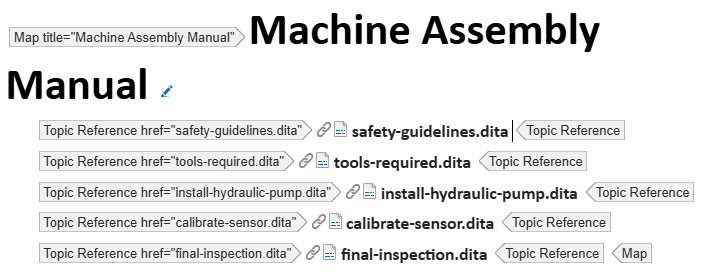
<map title="Machine Assembly Manual">
  <topicref href="safety-guidelines.dita"/>
  <topicref href="tools-required.dita"/>
  <topicref href="install-hydraulic-pump.dita"/>
  <topicref href="calibrate-sensor.dita"/>
  <topicref href="final-inspection.dita"/>
</map>
3. Reuse Content Efficiently
Manufacturing documentation often includes standard warnings, notes, or procedures that apply across multiple products. DITA’s reuse mechanisms help maintain consistency and reduce duplication.

<conref href="common/warnings.dita#pressure-warning"/>- Conrefs: Reuse content blocks.
- Keyrefs: Reference links and variables dynamically.
- Conditional attributes: Filter content based on audience, platform, product.
For instance, you can use conditional attributes to include or exclude steps based on the machine variant:

<step product="Model-X">
<cmd>Attach the Model-X specific bracket to the frame.</cmd>
</step>
4. Add Metadata
Metadata in DITA helps categorize and manage content effectively. Including metadata like the intended audience, product name, or maintenance level ensures that the right information reaches the right users.

<prolog>
<author>Jane Smith</author>
    <metadata>
      <audience type="technician"/>
      <prodinfo>
        <prodname>Hydraulic Press Model-X</prodname>
        <platform>Industrial</platform>
      </prodinfo>
    </metadata>
</prolog>
Why Manual DITA Workflows Fail at Scale
Manual DITA workflows simply don’t hold up when you’re managing complex documentation across products, SMEs, teams, and timelines.
- Broken Links: With numerous interdependent components, a single broken link can disrupt entire documentation sets, leading to confusion on the production floor.
- Manual Merge Conflicts: Collaborating across departments without automated version control often results in conflicting edits, causing delays and inconsistencies.
- Untracked Reuse: Reusing content without a centralized system makes it difficult to track where and how information is utilized, increasing the risk of outdated or inconsistent data.
- High Localization Costs: Manually updating and translating documents for global markets is time-consuming and expensive, especially when dealing with frequent product updates.
- Lack of Governance and Metrics: Without structured oversight, it’s challenging to ensure compliance with industry regulations and to measure documentation effectiveness.
These issues not only hinder productivity but can also impact product quality and compliance. Implementing a Component Content Management System (CCMS) becomes essential to streamline processes, maintain consistency, and ensure that accurate, up-to-date information is readily available across all departments.
What Is a CCMS?
A Component Content Management System stores content at the topic or asset level. It enables:
- Versioning and branching
- Reuse tracking
- Automated workflows
- Localization integration
- Auditability and roles
- Collaborative editing

Use Cases for DITA + CCMS
1. Software with frequent releases
Document once, reuse across platforms and builds. Automate publishing.
2. Localization at scale
Send only delta topics to translation. Automate reimport and publish.
3. Regulatory environments
Enforce review cycles and audit logs. Track every change and contributor.
4. Multi-product ecosystems
Write once, publish for 10 variants with filters.
Why Choose Componize?
Componize is a DITA-native Component Content Management System (CCMS) designed to streamline complex documentation workflows, particularly in manufacturing and industrial contexts.
Structured Content Management
- Organize and manage content at the component level, facilitating reuse and reducing duplication.
Version Control and Branching
- Maintain multiple versions of content to accommodate product updates and regional variations.
Workflow Automation
- Automate review and approval processes, enhancing collaboration and reducing time-to-market.
Localization Support
- Streamline translation processes with XLIFF workflows, ensuring accurate and timely multilingual documentation.
Integration Capabilities
- Connect with existing tools and systems through REST APIs, supporting seamless integration into your documentation ecosystem.
Trusted by industry leaders such as Airbus, Toyota, and Merck, Componize empowers organizations to deliver accurate, up-to-date documentation efficiently, meeting the rigorous demands of the manufacturing sector.